

Step 1: Create global templates
Define once at HQ — for every branch.
Define services, resource categories, permissions, data fields, and settings at HQ. Whitelist which branches receive them. New services live network-wide in seconds.
Loading
Run scheduling for five locations or five thousand — from one console. Global standards, local flexibility, audit-grade visibility.
 4,4
 4,5
 4,5
From mid-market chains to 700+ store estates. Used by:




Branch Manager runs the scheduling network — globally.
Branch Manager is the centralised management layer for organisations running scheduling across multiple locations. It is where the global rules live — services, resources, permissions, customer data structures, booking widget configurations, and the policies that govern how every branch operates.
It is also where the local exceptions are managed. Each branch inherits the global templates by default, and overrides specific elements only where the local reality demands it — different opening hours, different service durations, different permissions.
In your organisation, Branch Manager is run by the people responsible for operational consistency, regional performance, and IT governance — typically your HQ Operations Lead, your Regional Managers, and your IT / Security team.
One console. Every branch. Every decision.

Services, resources, permissions, and booking flows defined once at HQ. Replicated to every branch automatically. Updates propagate in seconds.
Branches can override specific fields where local reality demands it. You control which fields are open to override and which are locked.
Every override, every permission change, every branch action — logged, attributable, exportable. Built for the questions your compliance team will ask.
New branches inherit all global templates on creation. A new location can be live, configured, and taking bookings in days, not months.
Branch Manager is used by the people responsible for governance, regional performance, and IT security. Here's what each of them does with it.
The whole model in one picture: HQ defines global templates in Branch Manager, every branch inherits them as a full Web App account, and every booking channel runs off that single configuration. Running several countries? Each gets its own enterprise account — same model, own rules. Click any element to see how it works.
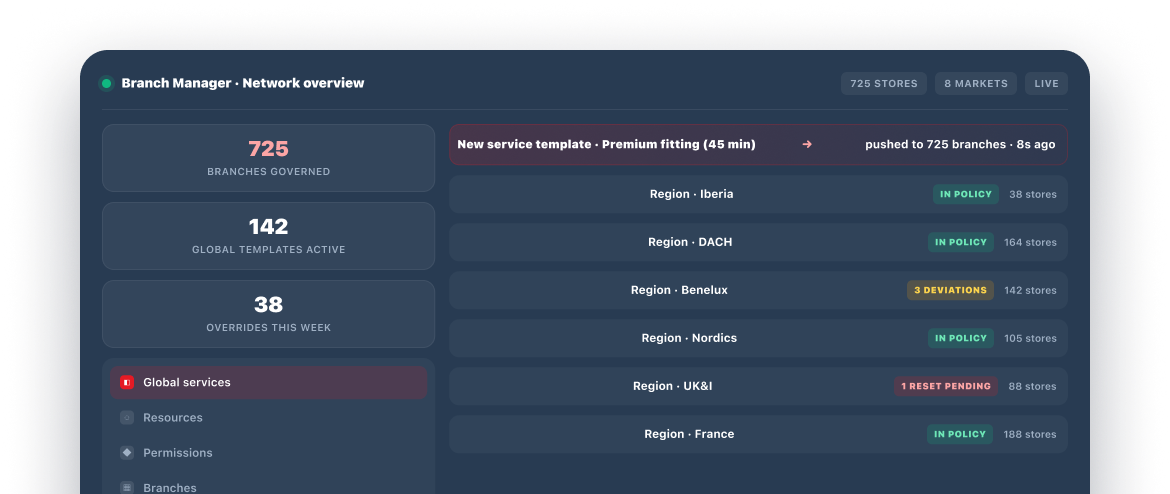
Branch Manager is where HQ defines global templates — services, group services, data fields, customers, permissions, and settings — and assigns them to every branch or a whitelisted subset. Changes propagate to all assigned branches in seconds; branch status flows back up.
Click any card or chip in the diagram — the panel explains that part of the model.
Each Scheduling Intelligence Domain shows up in Branch Manager as a set of configurable global rules and per-branch overrides. Highlighted features per domain — click through to explore each domain's full set.

Nexeye is one of Europe's largest optical retail groups — Pearle, Hans Anders, Eye Wish, and the rest of the portfolio operate across eight European countries with their own service catalogues, opening hours, and local regulations.
Before Branch Manager, every market managed its own scheduling independently — service definitions drifted, no cross-country reporting was possible, and rolling out a new initiative meant coordinating with each country team individually.
Today, Nexeye runs all 725+ stores through Branch Manager. Global service templates are managed centrally, with each market overriding only the local-specific elements.
Nexeye is now rolling out Walk-In & Queue Management as the next stage — orchestrated from Branch Manager across the same 725-store network.
Read the full Nexeye storyBranch Manager is the operating system of our retail network. We don't manage 725 stores. We manage one playbook, applied 725 times.



Plus everything connected via REST API, Webhooks, Zapier (5,000+ apps), and the TIMIFY Marketplace.
The four documents your internal stakeholders will ask for, prepared and ready. No NDA, no sales call gate — quick form, instant delivery.
Need something more specific for your review? Email <a href="mailto:security@timify.com">
Find answers to common multi-location scheduling, integration, and compliance questions below.
Let's review your multi-location setup and show you how Branch Manager governs scheduling at scale.

